A website may not show up in Google’s search engine results for different reasons. Let’s discuss it.
You’ve built a great site, but when you search for your services in your city, you see your competitors, but not you. You find yourself asking, “Why is my website not showing on Google?”
If this is happening, don’t panic. It is usually a solvable problem. Let’s answer the most critical questions about why your website isn’t ranking and how to get it seen by people in your area.
1. What Exactly Is Google Indexing?
Google indexing is a process that allows a site to get listed on Google’s search engine results page.
Before we fix the ranking, we have to ensure you exist in the system. Think of Google as a giant library and your website as a book.
- The Problem: If your book isn’t in the library’s catalogue, no one can find it.
- The Solution: You need to ensure Google has “indexed” (listed) your site. Without indexing, you cannot appear in search results, no matter how good your content is.
2. Did I Accidentally Block Google in WordPress?
This is the most common mistake for new WordPress users. You might be asking, “Is my settings page hiding my site?”

- The Check: In WordPress, there is a “Discourage Search Engines” button.
- The Fix: Go to Settings > Reading. Look for “Search Engine Visibility.” Ensure the box that says “Discourage search engines from indexing this site” is unchecked.
3. Am I Targeting Keywords People Actually Search For?
If your site is indexed but not getting visitors, ask yourself, “Is anyone actually searching for this topic?”
Choosing the wrong content is a major visibility killer. If you write a post about “My thoughts on cloudy days,” but nobody searches for that, you won’t get traffic.

- The Fix: Use Google Trends to find what your audience needs.
- Pro Tip: Instead of generic keywords, solve a problem. Don’t just write “Plumbing.” Write “How to fix a leaking pipe.”
4. How Do I Optimize My Page Content? (On-Page SEO)
Once you have a topic, how do you tell Google what the page is about? You need to optimize three key areas:
- Title Tag: The blue link in Google. Put your keyword here.
- Meta Description: The short summary under the link. Treat this like a sales pitch to get clicks.
- H1 Heading: The main headline on your actual page.
5. Is My Website Too Slow or Not Secure?
Google cares about safety and speed. Ask yourself: “Is my website frustrating my visitors?”
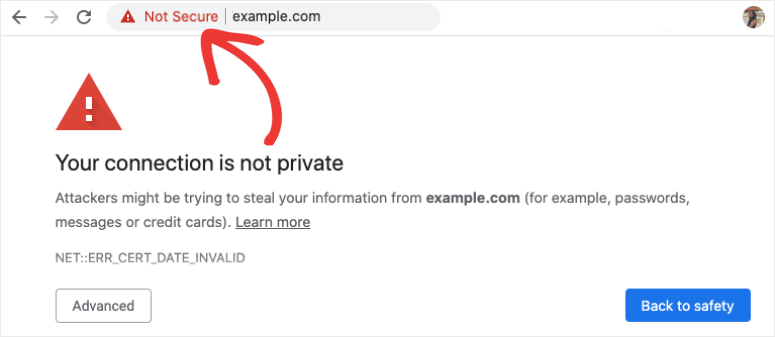
- HTTPS: Does your URL start with a locked padlock icon? If not, Google warns users that your site is “Not Secure”.
- Page Speed: If your site takes more than 3 seconds to load, users (and Google) will leave.
6. How Do I Rank for Local Searches? (Geo-Friendly SEO)
If you are a local business (like a dentist, restaurant, or repair shop), the most important question is, “How do I show up on Google Maps?”
This is where “Geo-Friendly” content matters. You don’t just want to rank for “Best Pizza”; you want to rank for “Best Pizza in [Your City Name].”
- Google Business Profile: You must claim and verify your business on Google. This is how you get into the “Local Pack” (the map list at the top of search results).
- Local Keywords: Include your city or region name in your website text (e.g., “Serving customers in Dhaka” or “Best Gym in New York”).
7. How Do I Build Authority? (Backlinks)
Finally, if you are doing everything right but still stuck on page 2, ask: “Do other websites trust me?“
- Backlinks: You need links from other trusted websites pointing to yours.
- The Strategy: If a popular local news site or a big industry blog links to you, Google sees your site as an “Authority” and ranks you higher.